Quran Player
Verse-by-verse Quran recitation, controlled from your Linux desktop. A background daemon drives the audio; a live Conky overlay keeps the current ayah in front of you — no cloud, no account, no window stealing focus.
👤 Who is this for?
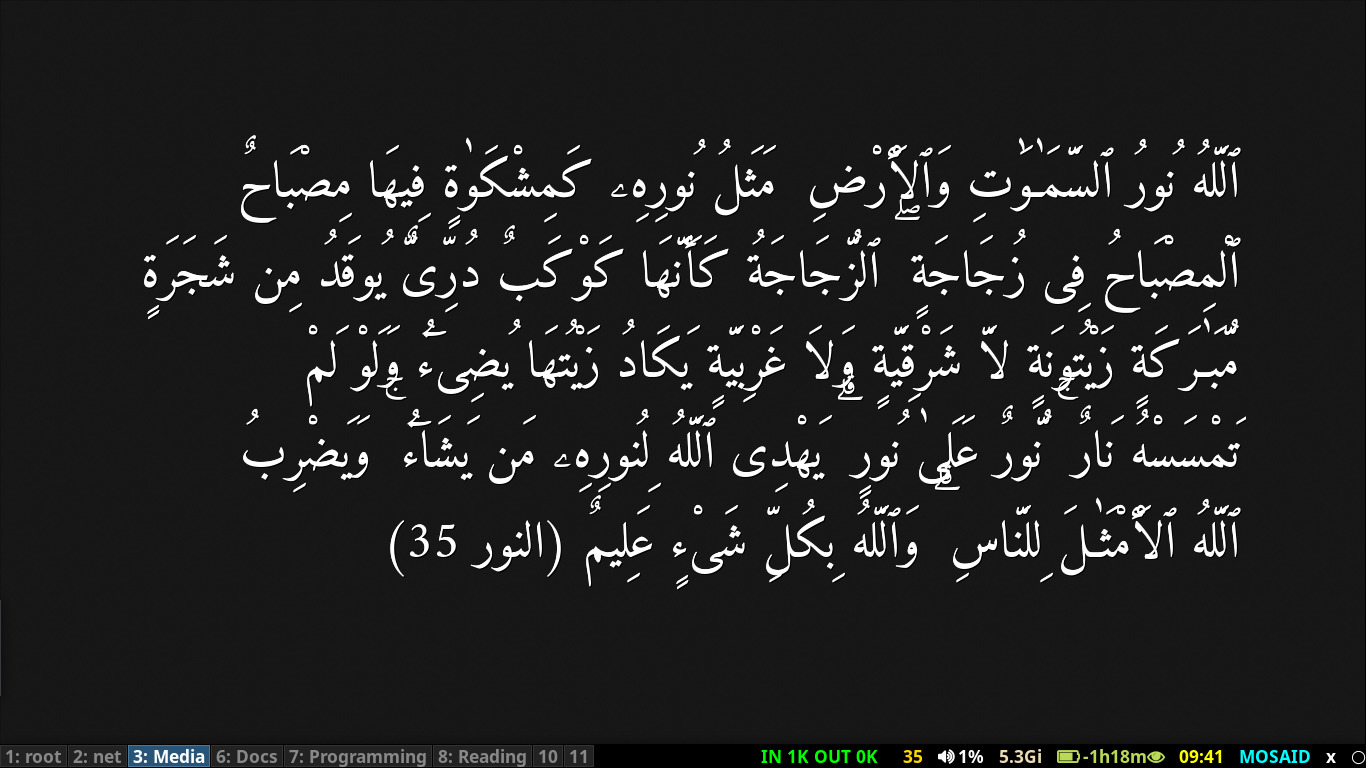
Quran Player is a Linux-native background daemon for verse-by-verse Quran audio playback with a live Conky overlay that renders the current verse right on your desktop. It stays in sync — when the verse advances, the overlay updates within half a second.
- Linux users who want Quran playback integrated into their desktop — not a separate app window
- Anyone using a tiling WM / minimal setup who prefers a Conky overlay to a GUI
- People who script their environment and want a programmable daemon over a Unix socket
- Users on X11 or XWayland (feh-based overlay solutions do not survive there; Conky does)
Looking for a full-featured GUI? See Quran Browser instead — Quran Player is the lean, daemon-native sibling.
✨ Key Features
Conky Desktop Overlay
- Live verse display, updates within 0.5 s
- Daemon-managed lifecycle (start / stop / toggle)
- Survives daemon restarts; orphans reaped automatically
- X11 native; works under XWayland on compatible compositors
Verse-by-Verse Playback
- Auto-advance through the entire Quran
- Repeat modes: single ayah, range, whole surah
goto,next,prev,ns,ps- Persistent state across sessions
Daemon + Unix Socket
- JSON
statusfor scripting - Any language can control it via the socket
- Socket permissions locked to
0600 - Atomic lock file, crash-safe PID management
Optional GUI Tray
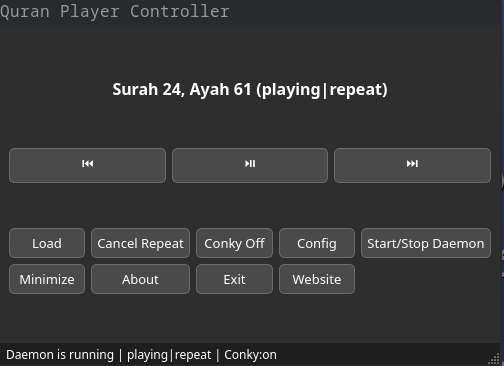
- PyQt5 tray controller
- Keyboard: Space / ← / → / Esc
- Conky toggle button
- Edit config in-place
Arabic Search Tool
- Full-text Uthmani + simplified search
- Hamza / diacritic normalization
- Interactive RTL dialog
- CLI mode for scripting
One-Command Install
python install.py— no root- Installs under
~/.quran-player/ - Incremental updates via
--clean - Clean uninstall with
--uninstall
🖥️ Screenshots
🚀 Install
# 1. Prerequisites (Debian / Ubuntu — adapt for your distro)
sudo apt install conky-all python3 python3-venv

# 2. Clone and install (no sudo for step 2)
git clone https://github.com/neoMOSAID/quran-player.git
cd quran-player
python install.py

# 3. Start the daemon — Conky launches automatically
quran-daemon start
quran-daemon play
The installer drops everything under ~/.quran-player/ and
creates CLI wrappers in ~/.local/bin/ —
quran-daemon, quran-gui, and quran-search.
~/.config/quran-player/sample/ on first run — so playback works
immediately, out of the box. To play the full Quran, download a recitation
set from EveryAyah.com
(or your own collection) into that directory, or point the daemon at it with
quran-daemon dir /path/to/audio.
sudo pacman -S conky (Arch) ·
sudo dnf install conky (Fedora).
For Arabic shaping in Conky, install fonts-hosny-amiri
(sudo apt install fonts-hosny-amiri).
override-type
window is honoured depends on the compositor (GNOME and KDE work; some wlroots
compositors do not render override windows). Audio playback, the daemon, and the
CLI are compositor-agnostic and work everywhere.
📥 Download
Current version: v2.0.0 (released 2026-10-20)
The ZIP archive is a source snapshot of the main branch
— install by running python install.py inside the extracted
directory. For tagged releases, use the GitHub Releases page.
System requirements:
Linux (X11 or XWayland) · Python 3.9+ · Conky · pactl (PulseAudio / PipeWire).
No root required.
💻 Usage
quran-daemon start              # daemon starts + conky launches
quran-daemon play | pause | toggle
quran-daemon next | prev
quran-daemon load 2:255         # surah:ayah
quran-daemon repeat 2:1:20      # repeat surah 2, ayahs 1–20
quran-daemon conky_off          # hide desktop overlay (audio keeps playing)
quran-daemon conky_on           # show it again
quran-daemon status             # JSON status
quran-daemon info               # full diagnostic dump
quran-daemon stop               # daemon + conky both go down
🖥️ Real-world i3 Integration advanced
This is how I actually use Quran Player day-to-day: the daemon hides in the background,
the multimedia keys on my keyboard drive playback, and the current verse sits quietly in
my i3blocks status bar. Everything below ships in my personal dotfiles —
copy, trim, or adapt to your WM. The wrapper path ~/bin/qd is my personal
choice; put it anywhere on your $PATH and update the references below accordingly.
🔑 Media keys
Drop this into any i3 config file that's included from your main
~/.config/i3/config. The qd wrapper (next section) is what
makes these one-liners; the daemon does the actual work.
# Media player (Quran / mpd)
bindsym XF86AudioPlay          exec --no-startup-id ~/bin/qd toggle
bindsym shift+XF86AudioPlay    exec --no-startup-id ~/bin/qd conky_toggle
bindsym XF86AudioPause         exec --no-startup-id ~/bin/qd pause
bindsym XF86AudioNext          exec --no-startup-id ~/bin/qd next
bindsym XF86AudioPrev          exec --no-startup-id ~/bin/qd prev
bindsym ctrl+XF86AudioNext     exec --no-startup-id ~/bin/qd ns
bindsym ctrl+XF86AudioPrev     exec --no-startup-id ~/bin/qd ps
bindsym shift+XF86AudioNext    exec --no-startup-id ~/bin/qd ns
bindsym shift+XF86AudioPrev    exec --no-startup-id ~/bin/qd ps
bindsym XF86AudioStop exec --no-startup-id ~/bin/qd stop| Key | Action |
|---|---|
| XF86AudioPlay | Play / pause (auto-starts daemon if needed) |
| Shift + XF86AudioPlay | Toggle Conky overlay |
| XF86AudioNext / Prev | Next / previous ayah |
| Ctrl or Shift + Next / Prev | Next / previous surah |
| XF86AudioStop | Stop the daemon (Conky goes down with it) |
🧰 The qd wrapper
A thin, stateless shell wrapper around the daemon's CLI. Two deliberate design choices:
- Auto-starts for transport commands (
play,toggle,next,prev,ns,ps,goto,load,repeat, bareN) — you can press Play with nothing running and it just works. - Does not auto-start for
pause,stop, orconky_*— those must fail loudly if the daemon isn't up, rather than silently spawn it to perform a no-op.
Liveness is determined by asking the daemon over its Unix socket, never by reading the PID file — so it stays correct even after a crash or an unclean shutdown.
Show full ~/bin/qd source
#!/bin/bash
# qd — Quran Player Daemon control wrapper.
#
# State ownership:
#   - PID file   : ~/.quran-player/control/daemon.pid
#   - Liveness   : ~/.quran-player/control/daemon.lock
#   - Socket     : ~/.quran-player/control/daemon.sock
#
# This wrapper is stateless. It never writes or deletes a PID file.

PY="$HOME/.quran-player/env/bin/python"
DAEMON="$HOME/.quran-player/daemon.py"

daemon_ready() {
    "$PY" "$DAEMON" status >/dev/null 2>&1
}

# Start the daemon if needed, wait until its socket answers.
ensure_running() {
    daemon_ready && return 0
    "$PY" "$DAEMON" start >/dev/null &
    local i
    for i in $(seq 1 30); do
        daemon_ready && return 0
        sleep 0.1
    done
    echo "Error: daemon failed to become ready within 3s" >&2
    echo "       see ~/.quran-player/control/daemon.log" >&2
    return 1
}

# Nudge i3blocks for an instant status refresh. No-op if absent.
refresh_bar() { pkill -RTMIN+8 i3blocks 2>/dev/null || true; }

case "$1" in
    start)
        if daemon_ready; then echo "OK (already running)"; exit 0; fi
        ensure_running && echo "OK" && exit 0
        exit 1
        ;;
    stop)
        if ! daemon_ready; then echo "OK (already stopped)"; exit 0; fi
        "$PY" "$DAEMON" stop
        ;;
    dir)
        shift
        if [ "$1" = "-h" ] || [ "$1" = "--help" ]; then
            "$PY" "$DAEMON" dir "-h"; exit 0
        fi
        path="$*"
        [[ "$path" != /* ]] && path="$(realpath "$path")"
        "$PY" "$DAEMON" dir "$path"
        ;;
    [0-9]*)
        ensure_running || exit 1
        "$PY" "$DAEMON" goto "$1"
        ;;
    load|repeat)
        command=$1; shift
        arg=$(IFS=:; echo "$*")
        ensure_running || exit 1
        "$PY" "$DAEMON" "$command" "$arg"
        ;;
    play|resume|toggle|next|prev|ns|ps|goto)
        ensure_running || exit 1
        "$PY" "$DAEMON" "$@"
        ;;
    *)
        # status, info, log, config, cleanup, about, conky_*, pause, stop
        # — do NOT auto-start; they must fail loudly if the daemon is down.
        "$PY" "$DAEMON" "$@"
        ;;
esac

# Ask i3blocks to re-poll on next tick. Silently skipped if absent.
refresh_barconky_toggle in the wrapper? It already is — it's one
of the daemon's built-in commands. The wrapper just forwards it. The daemon owns the Conky
process handle and the conky.enable config, so managing Conky anywhere else
would split state.
📊 Status bar widget (i3blocks)
The current surah and ayah live in the i3blocks status bar. Left-clicking the block opens the
GUI; right-clicking toggles play/pause. Requires jq
(sudo apt install jq).
Show full ~/.config/i3blocks/ayat.sh
#!/bin/bash
daemon="$HOME/bin/qd"

case $BLOCK_BUTTON in
    1)  # Left click → open GUI
        nohup "$HOME/.local/bin/quran-gui" >/dev/null 2>&1 </dev/null &
        ;;
    3)  # Right click → toggle pause/resume
        $daemon toggle
        ;;
esac

status_data="$($daemon status)"

# Check if daemon is running and playing
if echo "$status_data" | grep -q '"daemon_running": true'; then
    paused=$(echo "$status_data" | jq -r '.paused')
    surah_num=$(echo "$status_data" | jq -r '.surah')
    ayah_num=$(echo "$status_data" | jq -r '.ayah')

    if [[ -n "$surah_num" && "$surah_num" != "null" ]]; then
        surah_name=$("$HOME/.local/bin/quran-search" "$surah_num")

        # Add pause icon if paused
        if [[ "$paused" == "true" ]]; then
            icon="⏸️"
        else
            icon=""
        fi

        # i3blocks convention: full_text then short_text (do not dedupe!)
        echo "$icon $surah_name $ayah_num"
        echo "$icon $surah_name $ayah_num"
        echo "#FFD700"
    fi
fi
Show full ~/.config/i3blocks/config entry
[ayat]
command=~/.config/i3blocks/ayat.sh
interval=1
signal=8
Tip: signal=8 lets the wrapper force an instant refresh with
pkill -RTMIN+8 i3blocks — which the qd script above does
automatically at the end of every invocation. With interval=1 the widget polls
every second anyway, so the signal is optional and safe to drop if you prefer a quieter setup.
The status block output looks like الفاتحة 3 — surah name + ayah number, with a
⏸️ prefix when paused, rendered in gold (#FFD700) in the bar.
🛠️ Technology
💬 Support & Community
📝 Release History
Version history for Quran Player.
# Changelog
2.0.0 — 2026-10-20
•Linux-native, Conky-only. Dropped Windows/macOS support, removed feh and the PyQt viewer.
•Conky desktop verse display — daemon-managed lifecycle (start/stop/toggle with the daemon).
•New commands: conky_on, conky_off, conky_toggle.
•Crash-safe: orphaned conky processes are reaped on next start/stop.
•qd stop now guarantees conky is gone before returning.
•One-command installer: python install.py (no root, no venv management required from user).
•Replaced pillow with arabic-reshaper + python-bidi (needed by the Conky shaper).
•Socket permissions hardened to 0600; daemon lock acquired atomically before PID write.
•info command now queries the live daemon state over the socket (was reading stale state).
1.3.0 — 2026-10-18
•Cross-platform daemon (Linux/macOS/Windows)
•feh-based verse image display with PyQt fallback
•Initial public source release
Visits: 0
📄 Need LaTeX formatting?
Send me your homework, exam, or exercise content and I’ll turn it into a professional PDF.
Learn more →Recent Courses

BACCALAURÉAT INTERNATIONAL SCIENCES MATHÉMATIQUES, OPTION FRANÇAIS
28 Sep 2026, 110 views
Course • Maths • 2 Bac Science Maths


Terminal SE - Mathèmatiques: Cours et exercices
27 Sep 2026, 265 views
Course • Maths • 2 Bac Science
Most Viewed Courses
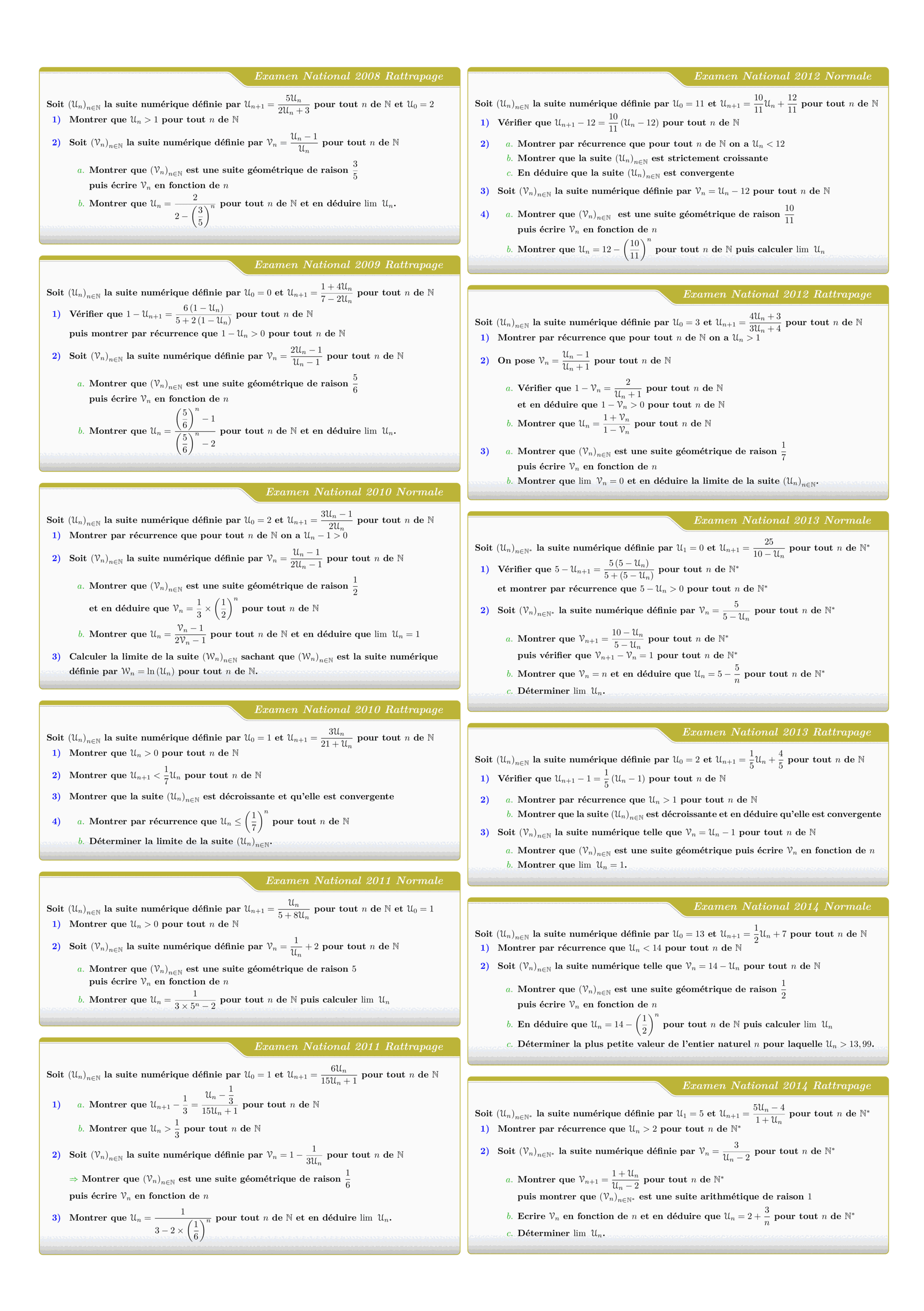
Tous les sujets des suites numériques des examens nationaux 2008 - 2022
Views: 3.13K
Exam • Maths • 2 Bac Science

Control 01 S01 En arithmétiques et Calcul vectoriel - A 2025-2026
Views: 2.09K
Exam • Maths • Tronc Commun Sciences

MATHEMATIQUES Examens nationaux 2003-2021 2 Bac.Sciences expérimentales
Views: 1.97K
Exam • Maths • 2 Bac Science
DM 1 - Arithmetiques, Calcul vectoriel et projection
Views: 1.94K
Exam • Maths • Tronc Commun Sciences
Recent Articles

Most Viewed Articles




The Ultimate Vim Setup (My 2024 vimrc ) : Essential Commands, Configurations, and Plugin Tips
Views: 1.47K
12 Apr 2024
Complete Tutorial: Creating Categories and Subcategories Using Pages in Pelican
Views: 1.12K
24 Jun 2025
Leave a comment