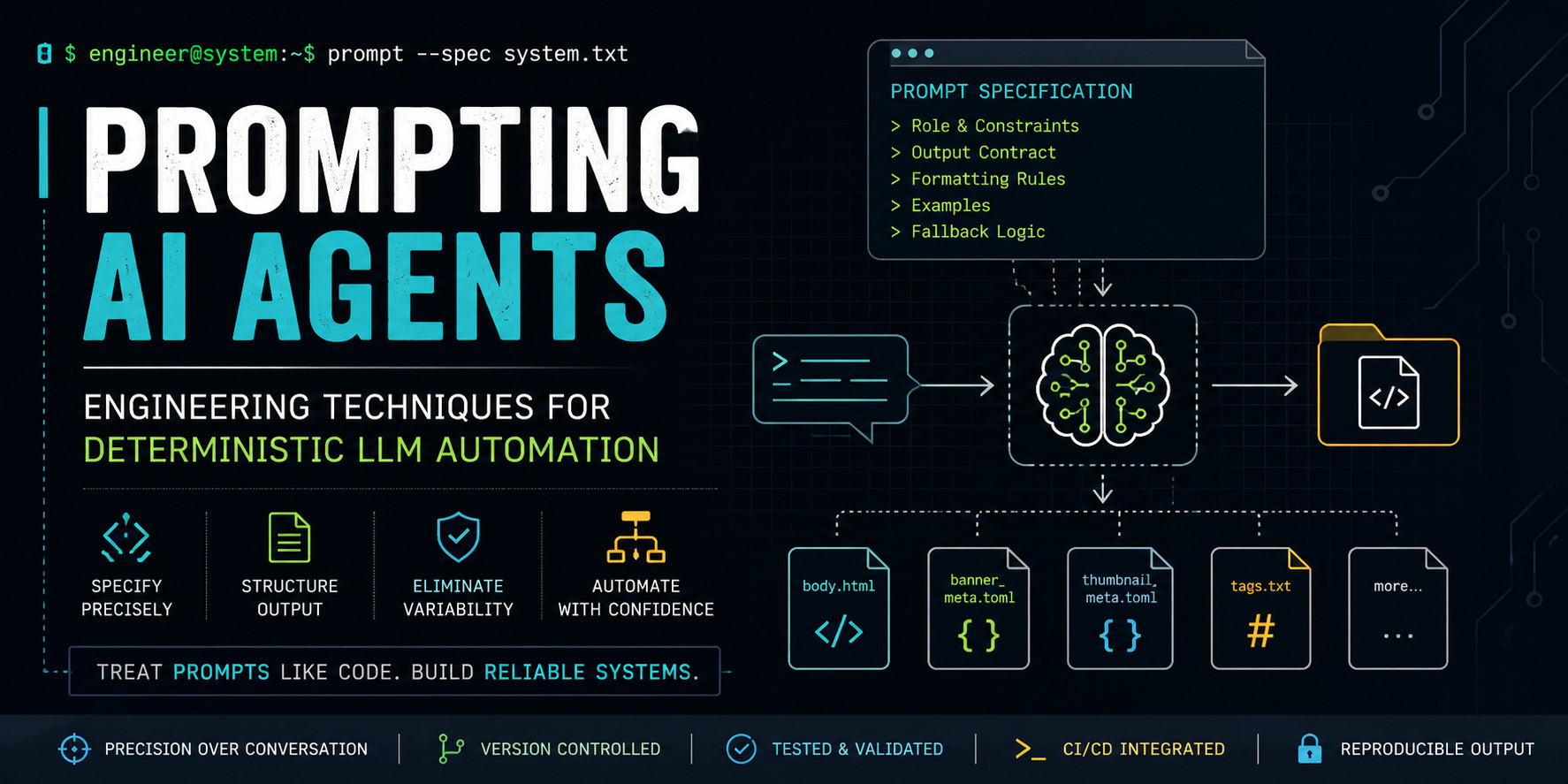
Engineering Deterministic Prompts for LLM Agents: A Systems Design Approach
The Problem: LLMs Are Powerful but Unpredictable
Every engineer who has worked with LLMs for more than a weekend eventually hits the same wall: the model produces beautiful output on Tuesday and hallucinated garbage on Wednesday. The same prompt, the same model, the same parameters — different results. For chatbots, this variability is tolerable. For automated pipelines, it is catastrophic.
I build static site tooling that depends on deterministic LLM output. My Pelican article generator ingests a specification, produces structured files, and feeds them into downstream SVG renderers, TOML parsers, and assembly scripts. If the LLM decides to output Markdown instead of HTML, or omits thumbnail_meta.toml entirely, the pipeline breaks silently.
This article documents the prompting architecture I developed to solve that problem. It is not a general guide to "writing better prompts." It is a systems design approach to treating LLM agents as programmable, composable, version-controlled infrastructure components.
Why Conversational Prompting Fails for Automation
The dominant paradigm for LLM interaction — casual back-and-forth conversation — emerged from chatbot interfaces. You ask a question, the model responds. You refine, it refines. This works for exploration but fails for automation for three reasons:
•Non-determinism: Natural language is inherently ambiguous. "Write a good article" means nothing precise enough for a machine to execute consistently.
•No structural contract: Conversations produce unstructured text. If your pipeline expects a TOML file with specific keys, a conversational prompt provides zero guarantees.
•Impossible versioning: How do you diff two conversations? You cannot meaningfully track changes to a prompt when the prompt is "uh, try making it sound more professional."
The engineering response to these failures is not to abandon LLMs — it is to stop treating them like conversation partners and start treating them like programmable systems with defined interfaces.
The Core Insight: Prompts as Machine-Readable Specifications
Look at the prompt that generated this article. It is not a casual request. It is a 300-line specification document with clearly delimited sections, explicit formatting rules, output contracts, and fallback behavior definitions. That structure is not incidental — it is the entire mechanism by which the system achieves repeatability.
A well-engineered prompt functions like an API schema. It defines:
| Component | What It Specifies | Analogy |
|---|---|---|
| Role definition | Who the model is, what perspective it adopts | System user in a Linux process |
| Audience constraints | Who the output serves, what knowledge to assume | Target architecture in a compiler |
| Output format | Exact file structure, naming conventions, encoding | Return type in a function signature |
| Stylistic rules | Tone, vocabulary restrictions, structural preferences | Linter configuration |
| Examples | Concrete instances of correct behavior | Unit tests |
| Fallback logic | What to do when constraints conflict or data is missing | Error handling in a try/catch block |
When you write a prompt this way, you are not asking the model to do something — you are programming it. The distinction matters.
Layered Prompt Architecture
After iterating through dozens of prompt designs for my Pelican workflow, I settled on a layered architecture. Each layer addresses a specific failure mode independently, making the system composable and debuggable.
Layer 1: Identity and Constraints
The top layer establishes who the agent is and what boundaries it operates within. This is not motivational fluff — it constrains the model's output distribution by anchoring it to a specific persona and knowledge domain.
In my prompt, this layer includes:
You are generating articles for a highly technical developer-focused
static website built with Pelican.

The site's audience primarily consists of:
- Linux users
- Power users
- Developers
- Engineers
- Technical writers

Avoid beginner-style fluff and generic marketing language.
Why this works: LLMs are trained on vast corpora with varying quality. By constraining the output distribution to "engineering documentation" rather than "general web content," you eliminate entire categories of bad output — clickbait, motivational filler, generic introductions — before the model writes a single word.
Layer 2: Negative Specification
Most prompt advice focuses on telling the model what to do. Equally important is explicitly telling it what not to do. I call this "negative specification," and it is disproportionately valuable for reducing output variance.
Consider how my prompt handles tone:
Avoid:
- excessive hype
- clickbait language
- motivational filler
- generic introductions
- AI-sounding transitions
- generic beginner tutorials
- shallow introductions
- excessive emojis
- generic AI phrasing
Each negative constraint eliminates a failure mode I encountered in earlier prompt iterations. The list grew organically through testing: run the prompt, observe a failure pattern, add a negative constraint targeting that pattern, repeat.
Layer 3: Structural Contract
This is the most critical layer for automation. It specifies the exact output format the agent must produce — not as a suggestion, but as a non-negotiable contract.
The key design decisions in my structural contract:
•Directory-based output instead of single file: A flat Markdown file is easy for humans but terrible for machines. By requiring a directory with named files, I enable downstream tools to consume specific outputs without parsing. The SVG banner generator reads banner_meta.toml directly — it never touches the article body.
•HTML body instead of Markdown: This forces the model to think structurally. Markdown encourages ambiguity ("just write some headers and paragraphs"). HTML forces explicit section boundaries, class names, and semantic elements.
•Metadata sidecars: TOML files for banner and thumbnail metadata separate content from presentation. The LLM extracts structured data (terminal commands, code snippets, quotes) into machine-parseable files that feed deterministic SVG generators.
Layer 4: Formatting Micro-Specifications
Even with a structural contract, LLMs produce inconsistent formatting. My prompt includes surgical rules that address specific recurring problems:
<!-- Exact code block structure -->
<pre class="language-python">
<code class="language-python">
<!-- code here -->
</code>
</pre>

<!-- CRITICAL: newline between pre and code -->
This rule exists because the Pelican static site generator processes HTML code blocks with specific expectations. A missing newline between <pre> and <code> breaks syntax highlighting. The constraint is not stylistic — it is a compatibility requirement.
Similarly, the {% raw %}...{% endraw %} rule exists because Pelican uses Jinja2 templating, and Python code containing {{ or {% would be interpreted as template syntax without escaping.
Layer 5: Fallback Logic
Production prompts must handle edge cases. My specification includes explicit fallback behavior for the delivery mechanism:
| Condition | Behavior |
|---|---|
| Platform supports binary downloads | Output ZIP file containing article directory |
| Platform only supports text output | Output self-contained bash script that recreates directory |
| Uncertain platform capability | Default to shell script (safer) |
This fallback logic is not optional — without it, the entire automation pipeline breaks when the AI platform changes its output capabilities. The prompt anticipates failure modes and specifies recovery behavior.
Composability Through File Separation
One of the subtlest but most important design decisions in my prompt architecture is the separation of concerns across files. Consider the metadata flow:
body.html          → Pelican article content
banner_meta.toml   → SVG banner generator input
thumbnail_meta.toml→ SVG thumbnail generator input
tags.txt           → SEO metadata, tag pages
category.txt       → Site taxonomy
Each file is independently consumable. The banner generator does not need to parse HTML. The tag indexer does not need to extract TOML. This composability means I can modify one component of the pipeline without touching others — the same property that makes Unix pipes powerful.
Testing Prompts Like Code
If prompts are specifications, they deserve testing. My workflow includes a validation script that runs after every prompt iteration:
import os
import tomllib

def validate_article_directory(path):
    required_files = [
        'title.txt', 'summary.txt', 'subtitle.txt',
        'bannertitle.txt', 'thumbtitle.txt',
        'category.txt', 'tags.txt', 'body.html',
        'banner_meta.toml', 'thumbnail_meta.toml'
    ]

    for f in required_files:
        assert os.path.exists(os.path.join(path, f)), f"Missing: {f}"

    # Validate TOML is parseable
    with open(os.path.join(path, 'banner_meta.toml'), 'rb') as fh:
        tomllib.load(fh)

    # Validate HTML contains no placeholder text
    with open(os.path.join(path, 'body.html')) as fh:
        html = fh.read()
        assert 'insert here' not in html.lower()
        assert 'todo' not in html.lower()

    print("✓ All validations passed")

validate_article_directory('./article')
This script catches the most common failure modes: missing files, unparseable TOML, and placeholder text the LLM sometimes inserts when it runs out of context. Running it after every generation turns prompt engineering from a subjective art into a measurable engineering practice.
Version-Controlled Prompt Evolution
My prompts live in Git alongside the code they help generate. This enables practices that are standard for software but rare for prompts:
•Diffs between prompt versions: When output quality changes, I can trace it to specific prompt modifications.
•Branching for experimentation: I can fork a prompt, modify the tone layer, and compare output distributions without losing the stable version.
•Rollbacks: If a new prompt version introduces regressions, git checkout prompts/v2/system.txt restores the known-good specification.
A typical prompt repository structure:
prompts/
├── v1/
│   ├── system.txt          # Full system prompt
│   ├── output_spec.yaml    # Machine-readable output contract
│   └── test_cases/
│       ├── expected_output/
│       └── validation.py
├── v2/
│   ├── system.txt
│   ├── output_spec.yaml
│   └── CHANGELOG.md        # Why this version exists
└── current → v2            # Symlink to active version
Why This Approach Produces Better Technical Content
The architecture I have described does not just make LLM output more predictable — it produces fundamentally better technical articles. Here is why:
•Structural constraints force depth: When a prompt requires directory-structured output with specific metadata files, the model cannot produce shallow content. Surface-level articles cannot fill a body.html that expects architectural diagrams, tradeoff analysis, and implementation details.
•Negative constraints eliminate filler: Explicitly forbidding "motivational filler" and "generic introductions" forces the model into the substantive content immediately. Every paragraph must carry technical weight.
•Audience constraints anchor complexity: Specifying "Linux users, power users, developers" as the audience prevents the model from drifting toward beginner explanations. It assumes competence and writes accordingly.
•Example-driven specification reduces ambiguity: Concrete examples of preferred titles ("Building a Static Site Search Engine Without External Services") communicate intent more precisely than abstract descriptions ("professional titles").
Practical Patterns for Production Prompts
Here are patterns I have validated across multiple prompt architectures. They generalize beyond my Pelican use case to any scenario where LLM output feeds into automated pipelines.
Pattern 1: The Output Contract Table
Instead of describing the output format in prose, specify it as a structured table:
| File | Format | Purpose | Required |
|------|--------|---------|----------|
| body.html | HTML | Article content | Yes |
| tags.txt | Comma-separated plaintext | SEO tags | Yes |
| banner_meta.toml | TOML | Banner decoration data | No |
Tables reduce ambiguity. The model either produces the specified files or it does not — there is no room for interpretation.
Pattern 2: The Concrete-Before-Abstract Rule
Always provide a concrete example before stating the abstract rule. This exploits the LLM's pattern-matching capabilities: it mimics the example, then the rule clarifies the generalization.
Bad (abstract first): "Use engineering-focused titles that avoid hype."
Good (concrete first): "Example: 'Building a Static Site Search Engine Without External Services.' This style — engineering-focused, descriptive, avoiding hype — should characterize all titles."
Pattern 3: Explicit Enumeration of Failure Modes
Instead of hoping the model avoids problems, list them:
Common failure modes to guard against:
- Outputting Markdown when HTML is specified
- Omitting the newline between <pre> and <code>
- Inserting placeholder text instead of generating content
- Producing empty TOML arrays when data is unavailable
This is the prompt equivalent of defensive programming. You are handling exceptions before they occur.
Pattern 4: The Minimum Viable Output Constraint
When output is optional, specify exactly when to omit it:
- If no suitable commands exist, omit the key entirely
  (do not create an empty array).
- Never include a key with an empty value.
- If you cannot fill a key with real content, delete it
  from the file.
This prevents the model from producing terminal_commands = [] when it should produce nothing at all — a distinction that matters when downstream parsers treat empty arrays differently from missing keys.
Tradeoffs and Limitations
This approach is not free. The costs are real and worth acknowledging:
•Prompt length: A 300-line specification consumes context window budget. For complex tasks, this is unavoidable — precision requires verbosity. But for simple tasks, shorter prompts with fewer constraints may suffice.
•Rigidity: Highly specified prompts reduce creative output. My article generator produces consistent results, but it will never surprise me with an unexpectedly brilliant structural innovation. That tradeoff is acceptable for automation; it may not be for exploratory writing.
•Maintenance burden: Prompts require updates when downstream systems change. If I modify my SVG generator to expect a new TOML key, the prompt must be updated, tested, and versioned. This is engineering overhead, but it is preferable to silently broken pipelines.
•Model dependence: Different models interpret the same specification differently. A prompt optimized for Claude may produce different results on GPT-4 or open-source models. Multi-model pipelines require cross-validation.
Integration with CI/CD Pipelines
The final stage of treating prompts as infrastructure is integrating them into automated pipelines. My article generation workflow now runs as part of a CI pipeline:
# .github/workflows/generate-article.yml
steps:
  - name: Generate article from prompt
    run: |
      python generate_article.py \
        --prompt prompts/current/system.txt \
        --topic "$TOPIC" \
        --output article/

  - name: Validate output structure
    run: python validate_article.py article/

  - name: Commit generated article
    run: |
      git add article/
      git commit -m "Auto-generated article: $TOPIC"
      git push
This pipeline transforms LLM prompting from an ad-hoc manual process into a repeatable, auditable, automated step in a larger build system. The prompt is source code. The LLM is a compiler. The output is an artifact.
Conclusion: Prompts Are Infrastructure
The fundamental shift in thinking that makes LLM automation reliable is this: prompts are not conversations. They are machine-readable specifications that produce structured output from unstructured language models. Designing them requires the same discipline as designing APIs, writing schemas, or specifying compiler behavior.
My Pelican article generation prompt works reliably not because I found magic words, but because I treated it as an engineering problem: identify failure modes, specify constraints precisely, separate concerns into composable files, test outputs programmatically, and version everything.
If you are building LLM-powered automation — whether for content generation, code review, data extraction, or report synthesis — the same principles apply. Design your prompts like you would design any other component in a production system. Define the interface. Specify the contract. Handle the edge cases. Test the output.
The LLM is the most powerful parsing and generation engine ever built. But like any powerful tool, it requires precise controls. Prompts are those controls. Engineer them accordingly.
Further Reading and References
•Anthropic's prompt engineering guide: While more conversational in tone, it contains useful patterns for structuring complex instructions.
•OpenAI's function calling documentation: For use cases where structured JSON output is sufficient, function calling provides a more rigid contract than free-text prompting.
•DSPy framework: For teams ready to move beyond manual prompt engineering, DSPy provides programmatic prompt optimization with automatic evaluation.
•The Pelican static site generator: The system that motivated this prompting architecture. Its emphasis on determinism and file-based workflows influenced the design patterns described here.
Recent Articles







Most Viewed Articles





The Ultimate Vim Setup (My 2024 vimrc ) : Essential Commands, Configurations, and Plugin Tips
Views: 1.45K
12 Apr 2024


Complete Tutorial: Creating Categories and Subcategories Using Pages in Pelican
Views: 1.11K
24 Jun 2025
Leave a comment